Contents
- Index
File Menu
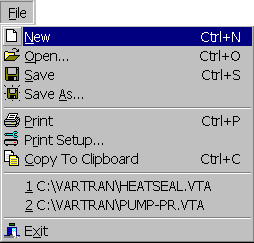
First item on menu bar containing the following menu items:
 New: Starts a new session. Shortcuts are Ctrl+N and button on toolbar. First asks whether to save the current session.
 Open...: Reads previously saved session from a file. The Open dialog box will be opened for selecting the file to open. VarTran files have the extension "vta". Shortcuts are Ctrl+O and button on toolbar. You will first be asked whether to save the current session.
 Save: Saves changes to a session back in the file which was originally opened to start the session. If no file is shown, the Save As menu item is invoked instead. The file associated with a session is displayed on the caption bar of the main window. Shortcuts are Ctrl+S and button on toolbar.
 Save As...: Saves the session in a new file. The Save dialog box will be opened for selecting the file to save the session in. An extension of "vta" will automatically be added to indicate it is a VarTran file. Shortcut is button on toolbar.
 Print: Prints the contents of the displayed tab of the active child window. Shortcuts are Ctrl+P and button on toolbar.
 Print Setup...: Displays the Print Setup dialog box for selecting the printer to use and for changing printer options such as portrait versus landscape, paper size and paper source. Shortcut is button on toolbar.
 Copy to Clipboard: Copies the contents of the displayed tab of the active child window to the clipboard. Shortcuts are Ctrl+C and button on toolbar.
 Exit: Exits the program. First asks whether to save the current session. Same as double clicking the system menu button (icon in top-left corner) or clicking the close button (x in top-right corner). A shortcut is to press Alt-F4.
In addition, the most recently saved sessions are displayed between the Copy to Clipboard and Exit menu items. Selecting one of them will reopen that session.