Contents
- Index
Optimization Options Dialog Box
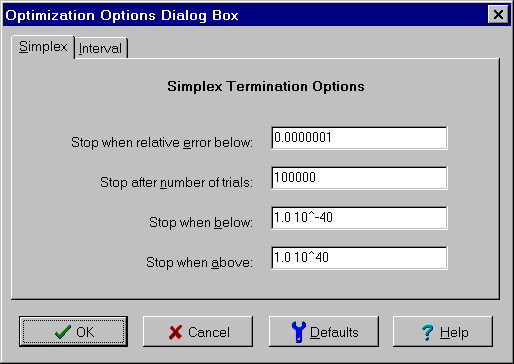
The Optimization Options dialog box is used to specify the stopping criteria for the different methods of optimization. It is displayed by selecting the Options button on the Find Optimal Targets dialog box. The controls are:
Simplex and Interval tabs:
Used to specify the method of optimization for which the stopping criteria rules apply.
Stop When Relative Error Below edit box:
Optimization terminates when the relative error is less than the specified value. For the interval method, the relative error is guaranteed to be below the value specified. Generally it is significantly better. The default value is 0.01 ensuring two significant digits.
For the simplex method, the relative error is estimated using the corners of the current simplex. This underestimates the relative error because these corners do not necessarily bound the optimum. The default value is 0.0000001, which frequently results in 4 or 5 significant digits. However, there is no guarantee and it is possible for the simplex method to terminate with only one or no significant figures.
Stop After Number Trials edit box:
Optimization terminates when the number of trials exceeds the specified number even if none of the other termination conditions have been met. For the interval method, a trial is a splitting of an interval. For the simplex method, a trial is a contraction, expansion or shifting of the simplex. In both cases the default value is 100,000.
Stop When Below edit box:
Optimization terminates when magnitude (absolute value) of the optimum is bounded below the specified value. This prevents the algorithm from fruitlessly trying to meet the relative error criteria when the optimum appears to be zero. For the interval method, The magnitude of the optimum is guaranteed to be below the specified value. For the simplex method, the optimization terminates when the magnitude of all corners of the simplex are below the specified value. This does not provide a guarantee. In both cases the default value is 1.0 10^-40.
Stop When Above edit box:
Optimization terminates when magnitude (absolute value) of the optimum is bounded above the specified value. This prevents the algorithm from fruitlessly trying to meet the relative error criteria when the optimum appears to be +/- infinity. For the interval method, The magnitude of the optimum is guaranteed to be above the specified value. For the simplex method, the optimization terminates when the magnitude of all corners of the simplex are above the specified value. This does not provide a guarantee. In both cases the default value is 1.0 10^40.
To close the dialog box and save the changes, click the OK button. To cancel the changes, click the Cancel button, press the Esc key or click the X in the upper right corner of the dialog box. To restore the stopping criteria to the default values, click the Defaults button. For help, click the Help button or press the F1 key.