Contents
- Index
View Equations Dialog Box
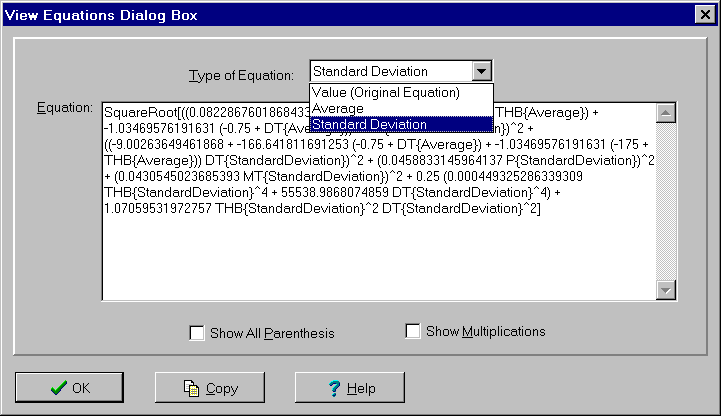
Used to view equations associated with an output variable. This dialog box is displayed by clicking the View Eq. button on the Output Variable dialog box. The controls are:
Type of Equation list box: Used to select which equation to display. Options are:
Value (Original Equation): This is the full equation used for the output in terms of the inputs. It is constructed by taking the equation entered and substituting the equations for other outputs into it.
Average: Equation derived for the average of the output in terms of the averages and standard deviations of the inputs. This equation is evaluated to calculate the value of the average displayed in the Capability Study window.
Standard Deviation: Equation derived for the standard deviation of the output in terms of the averages and standard deviations of the inputs. This equation is evaluated to calculate the value of the standard deviation displayed in the Capability Study window.
Equation edit box: Displays selected equation. Cannot be used to edit the equation. To copy the full equation to the clipboard, click the Copy button.
Show All Parenthesis check box: If checked, all parenthesis are displayed. If unchecked, the minimum number of parenthesis required to ensure the operations are performed in the correct order are displayed.
Show Multiplications edit box: If checked, multiplications are represented by asterisks. If unchecked, multiplications are represented by blanks.
To close the dialog box, click the OK button or press the Enter or Esc keys. For help, click the Help button or press the F1 key.