Contents
- Index
Options Menu
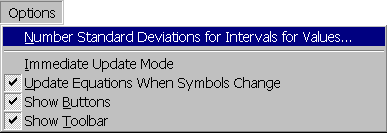
Fifth item on menu bar containing the following menu items:
Number Standard Deviations for Intervals for Values...
Displays the Number Standard Deviations for Intervals for Values dialog box for changing the number of standard deviations used to calculate the intervals for values.
Immediate Update Mode
If checked, causes all child windows to be immediately updated following each change. This may result in delays if a series of changes are made or if numerous windows must be updated. Removing the check, delays updating child windows. When in delay update mode and a child window requires updating, a red X is drawn through it. Clicking on the window will cause the window to update itself. The top child window is always automatically updated. The delay update mode is the default mode and is in effect each time the program is started.
Update Equations When Symbols Change
If checked and the symbol for a variable changes, automatically changes all reference to the variable in any equations. The update symbols mode is the default mode and is in effect each time the program is started.
Show Buttons
If checked, shows buttons at bottom of child windows. The state of this menu item is stored in the system registry and remains in effect until changed.
Show Toolbar
If checked, shows toolbar. The state of this menu item is stored in the system registry and remains in effect until changed.