Contents
- Index
Minitab
For at least version 13 of the Minitab, VarTran will automatically convert the effects table from a response surface analysis into an equation of the format required for either an output variable or objective function. This task is performed using the Paste Equation dialog box.
To obtain the effects table from Minitab, first perform the response surface analysis. Find the section shown below that is titled: "Estimated Regression Coefficients ... using data in uncoded units". It is important that it be in uncoded units. Highlight the rows containing coefficients starting with the one labelled: Constant. Copy this to the clipboard by selecting Minitab's Edit-Copy menu item or by pressing Ctrl+C keystroke combination. It is now ready to be pasted into the Paste Equation dialog box.
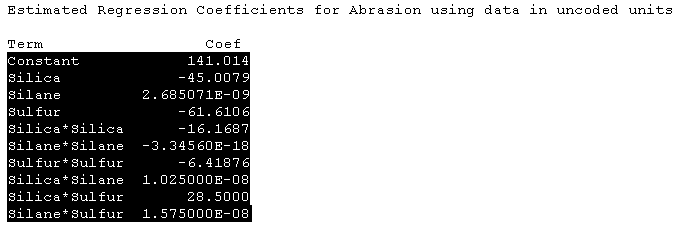
The following conversions are performed automatically:
Variables are converted to valid symbols. Illegal characters are replaced by underscores and the symbol may be shortened. The original variable name from Minitab is preserved in the variable name field of VarTran when input variables are automatically created.
Numbers are converted from the e-format (1.25E-08) to the 10^ format (1.25 10^-8) used by VarTran.