Contents
- Index
Paste Equation Dialog Box
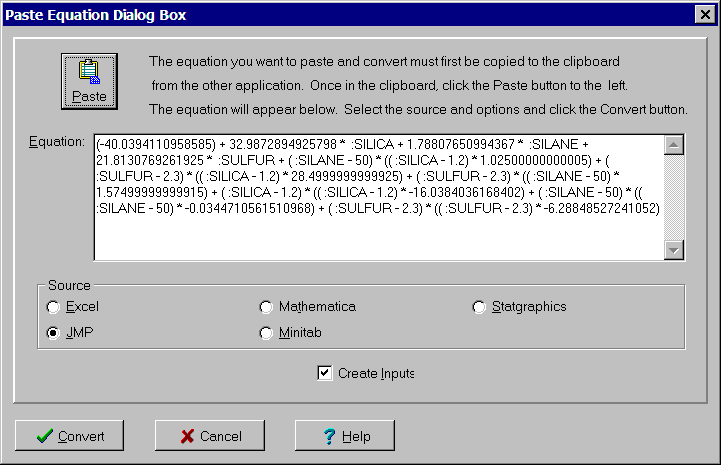
The Paste Equation dialog box is used to paste and convert an equation from another software package. Supported packages include Minitab, JMP, Statgraphics, EXCEL and Mathematica. The equation is converted into the format required for either an output variable or objective function. The dialog controls are:
Paste button:
Click to paste equation from clipboard into Equation edit box. You must first copy or cut the equation to the clipboard from the other application.
Equation edit box:
Used to display equation to be converted. Read only.
Source radio box:
Click the application the equation was copied from. VarTran will attempt to identify the source automatically as the equation is pasted in.
Create Inputs check box:
Check if you want input variables referenced in the equation to be automatically generated. When generating these variables, VarTran uses the name field to determine if a variable already exists. Name fields should not be edited until all equations have been converted.
Once the equation to be converted has been pasted into the Equation edit box and the appropriate options selected, click the Convert button to complete the conversion process. The equation will replace the equation in the Output Variable dialog box or objective function in the Objective Function dialog box that displayed this dialog box.
To abort the conversion process, click the Cancel button, press the Esc key or click the X in the upper right corner of the dialog box. For help, click the Help button or press the F1 key.