Contents
- Index
Objective Function Dialog Box
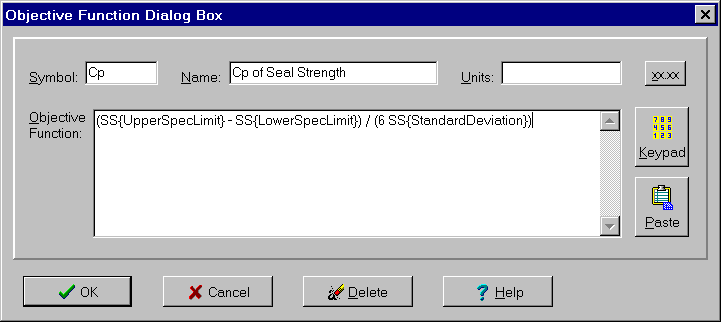
The Objective Function dialog box is used to enter and change information concerning an objective function. It is one of four variable dialog boxes. The dialog controls are:
Symbol edit box:
Used to enter a unique symbol to represent the objective function in equations. It can be any combination of letters, the digits 0-9 and underscores so long as the first character is not a digit. It can be of any length but is best limited to 1-4 characters.
Name edit box:
Used to enter a more detailed name or description of the objective function. It can be any combination of characters and any length.
Units edit box:
Used to enter the units of measure associated with this objective function (optional). Can be any combination of characters and any length.
Precision button:
Displays popup menu for specifying precision to display tolerances in Capability Study window, Summary Table window and other child windows. Default is 5 significant digits. Can be used to specify either the number of significant digits or the number of digits after the decimal point.
Objective Function edit box:
Used to enter an objective function that can include the characteristics of any input and output variables as well as category inputs and other objective functions. Must be a valid expression.
For continuous input variables and output variables, the following characteristics can be included:
Continuous Input Variable: Target, Average, StandardDeviation, UpperSpecLimit, LowerSpecLimit.
Output Variable: Average, StandardDeviation, Cp, Cc, Cpk, PercentDefective, ZScore, CoefficientVariation, Cpm, RootMeanSquareError, LowerIntervalValues, UpperIntervalValues, DistanceInsideSpec, DistanceFromTarget, LowerSpecLimit, UpperSpecLimit, Target.
References to a characteristic should be of the form "Variable Symbol { Characteristic }". For example: "SS{Cpk}". Longer characteristic names can be abbreviated by using only the capital letters in the name: T for Target, SD for StandardDeviation, DIS for DistanceInsideSpec, LSL for LowerSpecLimit and so on.
The objective function can also include categories of category input variables of the form "Variable Symbol { Category Symbol }". This reference has the value 1 when the given category is the selected category and a value of 0 when it is not. Categories are selected using the Category Input dialog box.
An objective function can reference other objective functions simply by using the symbols associated by the objective functions. Recursive or circular references are not allowed.
While an objective function can be directly typed into the Objective Function edit box, it is generally simpler to enter it using the Keyboard Equations dialog box. To display the Keypad Equations dialog box, click the Keypad button. You can also paste an equation from some other program using the Paste Equation dialog box.
Constraints can also be specifying as part of the objective function.
As you enter information, the status bar at the bottom of the program window is automatically updated to reflect any errors. Other child windows are notified of the changes as well and will update themselves according to the update mode selected on the Options menu. The updates occur when the focus is transferred to another control by clicking on some other control or by pressing the Tab or arrow keys.
To close the dialog box and save the changes, click the OK button. To cancel the changes including the addition of a new variable, click the Cancel button, press the Esc key or click the X in the upper right corner of the dialog box. To delete the variable, click the Delete button. For help, click the Help button or press the F1 key.