Contents
- Index
Notes Window
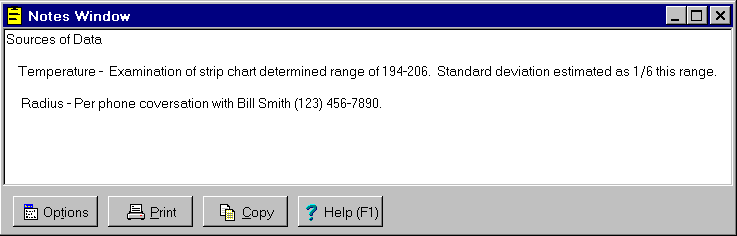
The Notes window is a child window that provides a text editor for recording notes, comments, and reminders. The text entered into the Notes window is saved in the same file as other data entered during the session. It can be opened by clicking on the  button on the toolbar or by selecting the Notes Window menu item from the
 Variables menu. Click on the X in the upper right corner to close this window.
The buttons at the bottom can be hidden by removing the check from the Show Buttons menu item on the Options menu. When hidden, the popup menu can still be used to perform the functions of these buttons. The following buttons are available:
 Clicking this button displays the popup menu below associated with this window. This popup menu has menu items that correspond to each of the buttons shown at the bottom of the window. It also has items that can be used to edit the text (Undo, Copy, Cut, Paste, Select All). A short cut is to right mouse click on the text edit box.
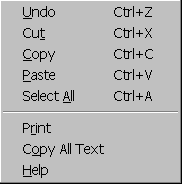
 Prints all text displayed in the Notes window, whether it is selected or not. Shortcuts are to click the Print button on the toolbar or to select the Print menu item on the
 File menu.
 Copies all text displayed in the Notes window to the clipboard, whether it is selected or not. Shortcuts are to click the Copy to Clipboard button on the toolbar or to select the Copy to Clipboard menu item on the
 File menu.
 Displays help on using this window. Short cut is to press F1 key.