Contents
- Index
Variables Menu

Second item on menu bar containing the following menu items:
 Add: Used to add a new variable. Displays menu for selecting type of variable shown below. The appropriate variable dialog box is then displayed so that the variable's information can be entered. Shortcut is button on toolbar.

Duplicate Variable...: Displays Number Duplicate Copies dialog box for making duplicate copies of a variable.
Edit: Displays additional menus for selecting a variable to edit as shown below. Shortcut is to double click on the variable in the I/O System window or any of the other child windows that displays information about the variables.

Modify All Tolerances: Displays additional menus for changing the tolerances of all continuous inputs variables at one time.
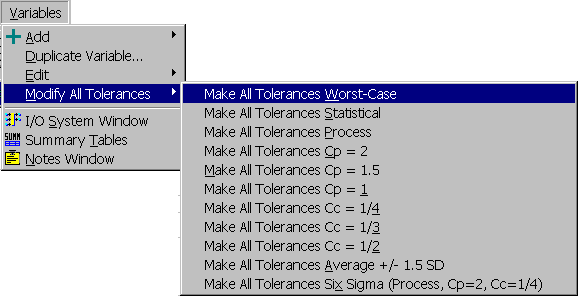
Make All Tolerances Worst-Case Sets the Type of Tolerance field of all continuous input variables to worst-case tolerances.
Make All Tolerances Statistical Sets the Type of Tolerance field of all continuous input variables to statistical tolerances.
Make All Tolerances Process Sets the Type of Tolerance field of all continuous input variables to process tolerances.
Make All Tolerances Cp = 2 Sets the Standard Deviation field of all continuous input variables to "(USL-LSL)/12" which results in a Cp of 2.
Make All Tolerances Cp = 1.5 Sets the Standard Deviation field of all continuous input variables to "(USL-LSL)/9" which results in a Cp of 1.5.
Make All Tolerances Cp = 1 Sets the Standard Deviation field of all continuous input variables to "(USL-LSL)/6" which results in a Cp of 1.
Make All Tolerances Cc = 1/4 Sets the Average Delta Upper and Average Delta Lower fields of all continuous input variables to "(USL-LSL)/8" which results in a Cc of 1/4.
Make All Tolerances Cc = 1/3 Sets the Average Delta Upper and Average Delta Lower fields of all continuous input variables to "(USL-LSL)/6" which results in a Cc of 1/3.
Make All Tolerances Cc = 1/2 Sets the Average Delta Upper and Average Delta Lower fields of all continuous input variables to "(USL-LSL)/4" which results in a Cc of 1/4.
Make All Tolerances Average +/- 1.5 SD Sets the Average Delta Upper and Average Delta Lower fields of all continuous input variables to "1.5 SD".
Make All Tolerances Six Sigma (Process, Cp=2, Cc=1/4) For all continuous input variables, sets the Type of Tolerance field to process, sets the Standard Deviation field to "(USL-LSL)/12", which results in a Cp of 2, and sets Average Delta Upper and Average Delta Lower fields to "(USL-LSL)/8", which results in a Cc of 2. This causes all inputs to be six sigma quality.
 I/O System Window: If the I/O System window is closed, this menu item will open a new one. Otherwise it will make the I/O System window the top child window. Shortcut is button on toolbar.
 Summary Table: Displays the
 Summary Table window displaying the data entered for the variables. Shortcut is button on toolbar.
 Notes Window: Displays a
 Notes window for typing notes and comments. Shortcut is button on toolbar.